

Guidance
Lapel Radio Microphone Guide
https://media.ed.ac.uk/id/1_9r7i0bm2?width=NaN&height=NaN&playerId=55171522 Positioning the Microphone Attach the bodypack to your clothing or place it in a suitable pocket. Clip the microphone to your clothing or lanyard. Position the microphone ap…
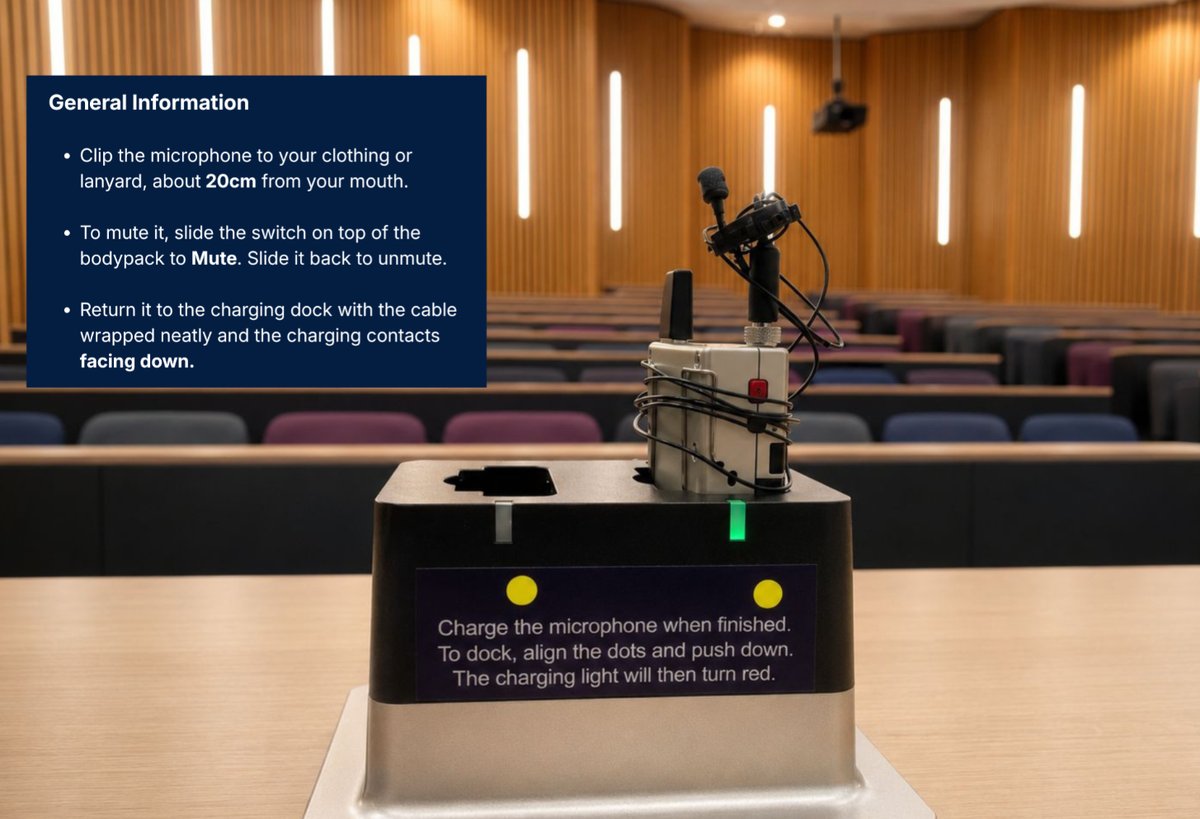
Positioning the Microphone
- Attach the bodypack to your clothing or place it in a suitable pocket.
- Clip the microphone to your clothing or lanyard.
- Position the microphone approximately 20 cm from your mouth for the best audio quality.
Muting the Microphone
- Locate the slide switch on the top of the bodypack.
- Slide the switch to the MUTE position to mute the microphone.
- When muted, the bodypack LED will show yellow/green and no audio will be transmitted.
- To unmute the microphone, slide the switch back to the MIC position.
- When active, the bodypack LED will show green and audio will be transmitted.
Charging the Microphone
- Gently wrap the microphone cable around the bodypack.
- Secure the microphone head by clipping it onto one of the wrapped sections of cable.
- Return the bodypack to the charging dock, ensuring it is seated correctly.
- Place the bodypack of the Microphone back in the charging port, ensuring the charging contacts are facing downwards.
Note: Always handle the microphone cable carefully to avoid unnecessary strain or damage.